

VERSION HISTORY
LIRA-FEM
- Mass redistribution
- Damping ratio
- Seismic isolators
- Pushover Analysis
- Finite element "Joint"
- New types of perfectly rigid body (PRB)
- Nonlinear behaviour of soil
- New type of force
- Nonlinear custom cross-sections
- Accounting for orthotropy
- Analysis parameters
- Analysis of reactions
- Stresses and forces
- Dynamics
- Nonlinearity
- Finite elements
- Calculation and Performance
BIM Technology
IFC improvements
Improved import of BIM model from IFC.
- Step-by-step model import: implemented the ability to load the model in parts — first certain types of objects, then others. This is convenient when working with large BIM models and when generating the design model.

- Updating selected objects from IFC: added a function to update selected objects — properties and geometric position — based on IFC file data without re-importing the entire model, helping maintain project relevance and synchronization with the BIM environment.
- Placing buildings on layers: when importing an IFC file containing multiple buildings, each building is automatically placed on a separate layer.
- Selecting buildings for import: if the IFC contains several buildings, you can now choose which ones to import into the project.
- Improved import of objects located in IFC blocks.
- In the IFC Import Settings dialog, columns with editable parameters are highlighted in blue for quick identification of values available for modification.
- In the Sections tab, columns Object Type and Object GUID have been added, allowing you to select the object type — beam, column, pile — for each imported section.
- Extended the set of imported parameters for the IfcSpace / Room object.
- Added support for importing the IfcSite object and related IFC model parameters.
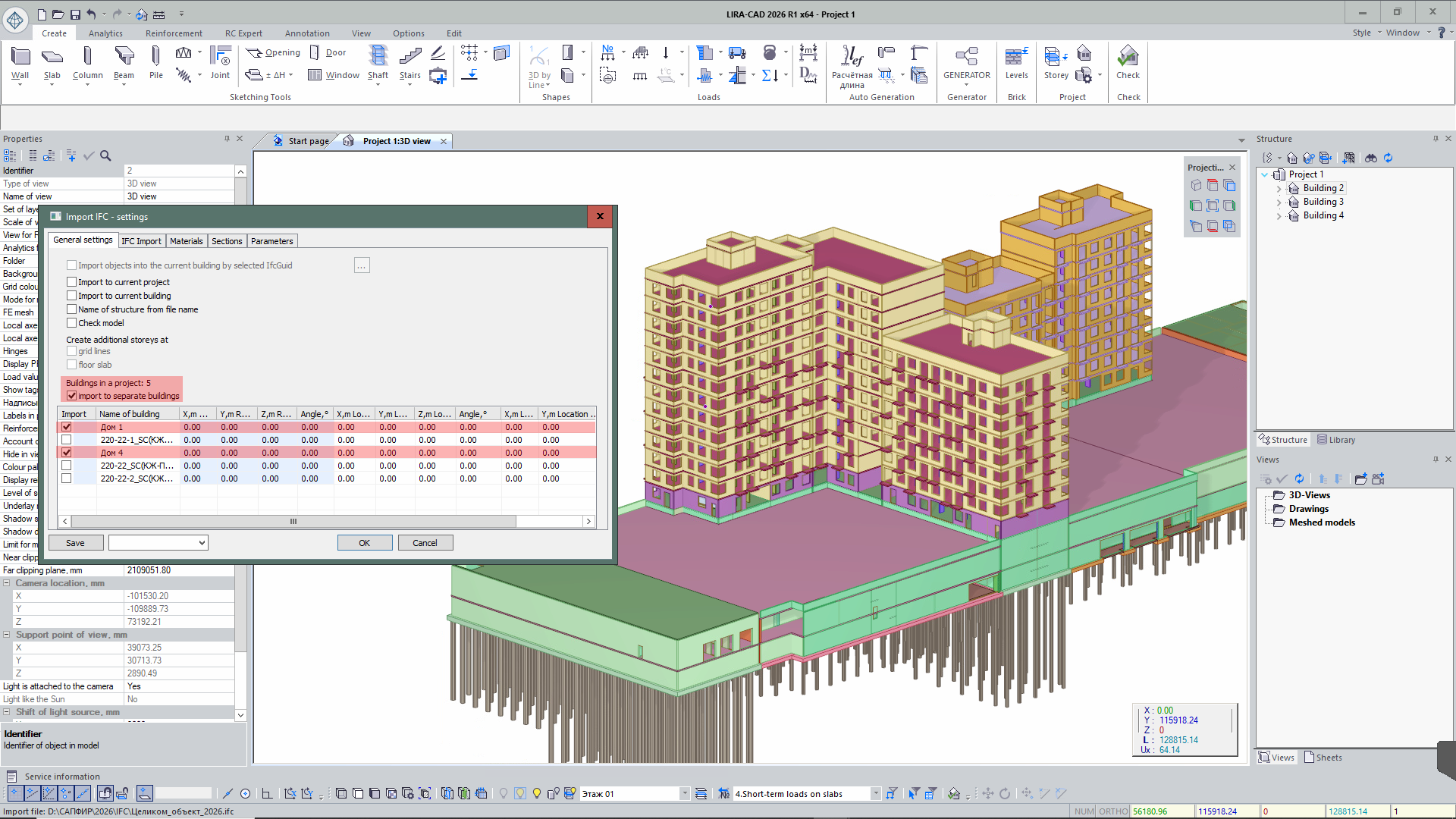
Improved export of BIM model to IFC.
- When exporting from SAPFIR to IFC, object identifiers IfcGUID and ID are additionally recorded, ensuring accurate matching of elements during re-import of the model.
- When exporting IFC models with capitals, correct geometry formation of capitals is ensured — trimmed along the slab perimeter and matching their dimensions.
SAF improvements
- Updated SAF format import: added support for new data describing cross-sections of beams, columns, and other bar elements.
Generator improvements
- The Generator system has been updated, significantly increasing performance speed.
-
In addition, new functions have been added to improve usability:
- ability to collapse the Generator window;
- automatic zoom to the last edited fragment of the algorithm when opening the dialog window;
- ability to align nodes on the canvas;
- ability to copy nodes from one project to another;
- canvas grid for convenient work with the algorithm;
- improved grouping of nodes;
- ability to transfer and duplicate links to other node inputs.

New Generator Nodes
- Exclude objects from project — a node that assigns objects the attribute “Do not use in project”. Such objects are not displayed in the LIRA-CAD graphical space and do not participate in the design model.
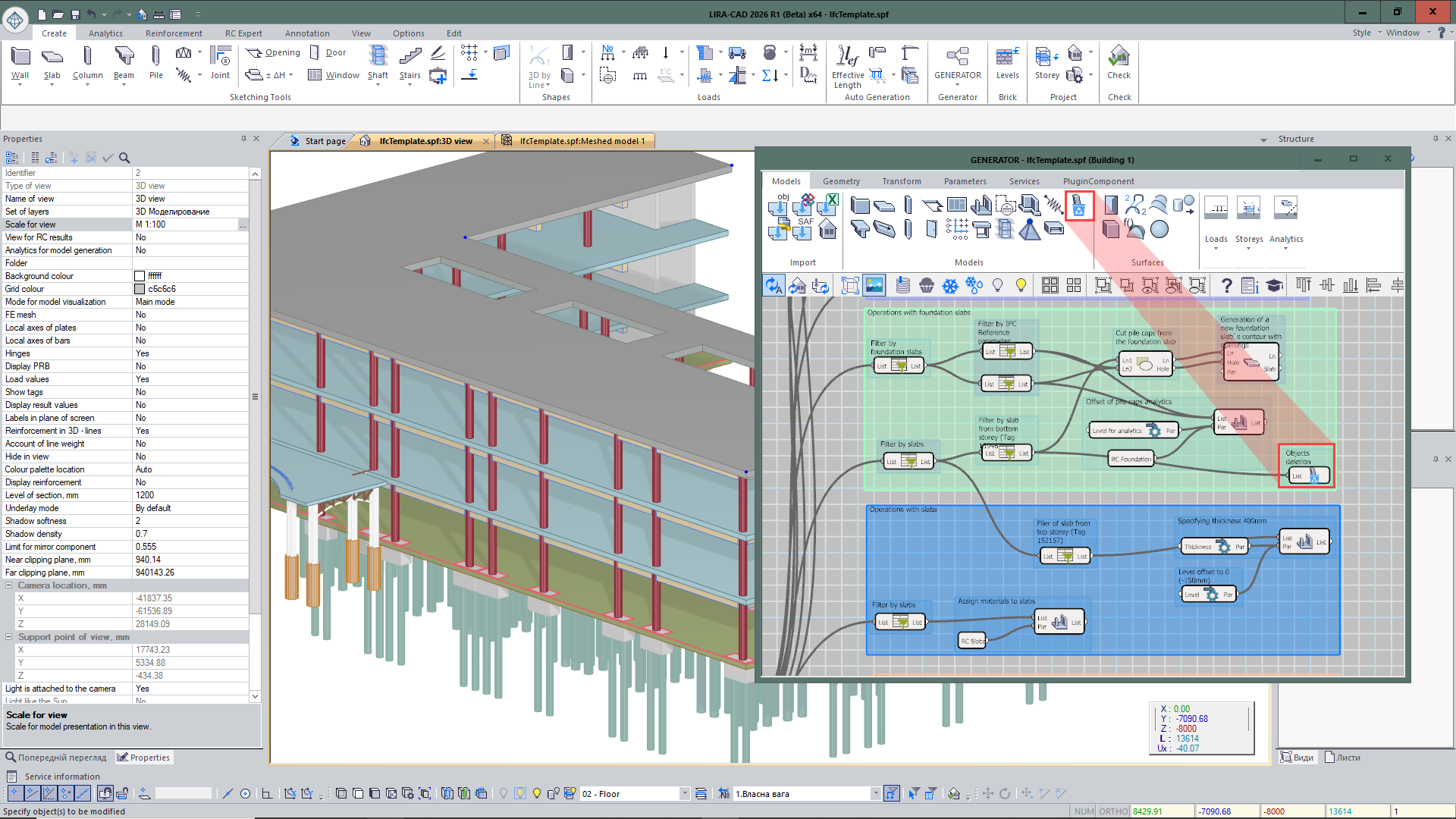
- Special load — a node that sets parameters of a special load for input objects.
- End and midpoint of line — obtaining points at the beginning, end, and middle of a curve.
- Extend polyline — allows increasing the length of a polyline by a specified value at the beginning or end of the curve.

- Line by vector — creates a line of specified length from a given point along a vector that defines the direction.
- Split line into segments — a node that allows splitting a curve into a specified number of segments or with a given step.
- Line length — determines the length of a line.
- Distance between lines — determines the maximum or minimum distance between lines.
- Distance to line — determines the shortest distance from a point to a line.
- Split objects by floor levels — automatically divides elements by floor levels if their geometry in height extends beyond one floor.
Improvements to Existing Nodes
- For the Tunnel node, a number of improvements have been implemented to expand data transfer capabilities in the graph. Now the tunnel name can be set not only by number but also as a custom user-defined name reflecting the nature of the transmitted data.
- After creating an input Tunnel node with a specified name, the output node can be quickly added via the context menu, which displays a list of all tunnels already created in the project. The data composition has also been expanded: the node supports transferring not only objects but also numeric parameters.
- For objects imported from IFC, filtering by parameters recorded in the original IFC file has been added. This allows faster searching and analysis of model elements by their attribute data.
- Improved work with DWG underlays: if files are located in one folder, for a group of selected nodes you can now simultaneously specify a new placement path. Previously, when changing the location of a large number of DWG files, each file had to be manually selected and its path updated separately. Now it is enough to select a group of underlays and assign them a new folder in one action.
- Added the ability to form spaces from closed polylines in DWG underlays, simplifying room creation and speeding up model preparation based on drawing data.
- For the Surf node, parameters for building and processing surfaces have been expanded. It is now possible to form a surface not only by splines but also by a broken polyline, allowing correct description of complex broken-shape models. Settings for the intersection line of the surface with a plane have also been implemented: the user can specify whether it should be formed by the physical or analytical model.
- In the Kinematic surface node, a Material parameter has been added, allowing assignment of material to the created surface directly during its creation.
- In the Door opening and Window opening nodes, a parameter for forming a bar analogue in the wall has been added.
Autodesk Revit Plug-in improvements
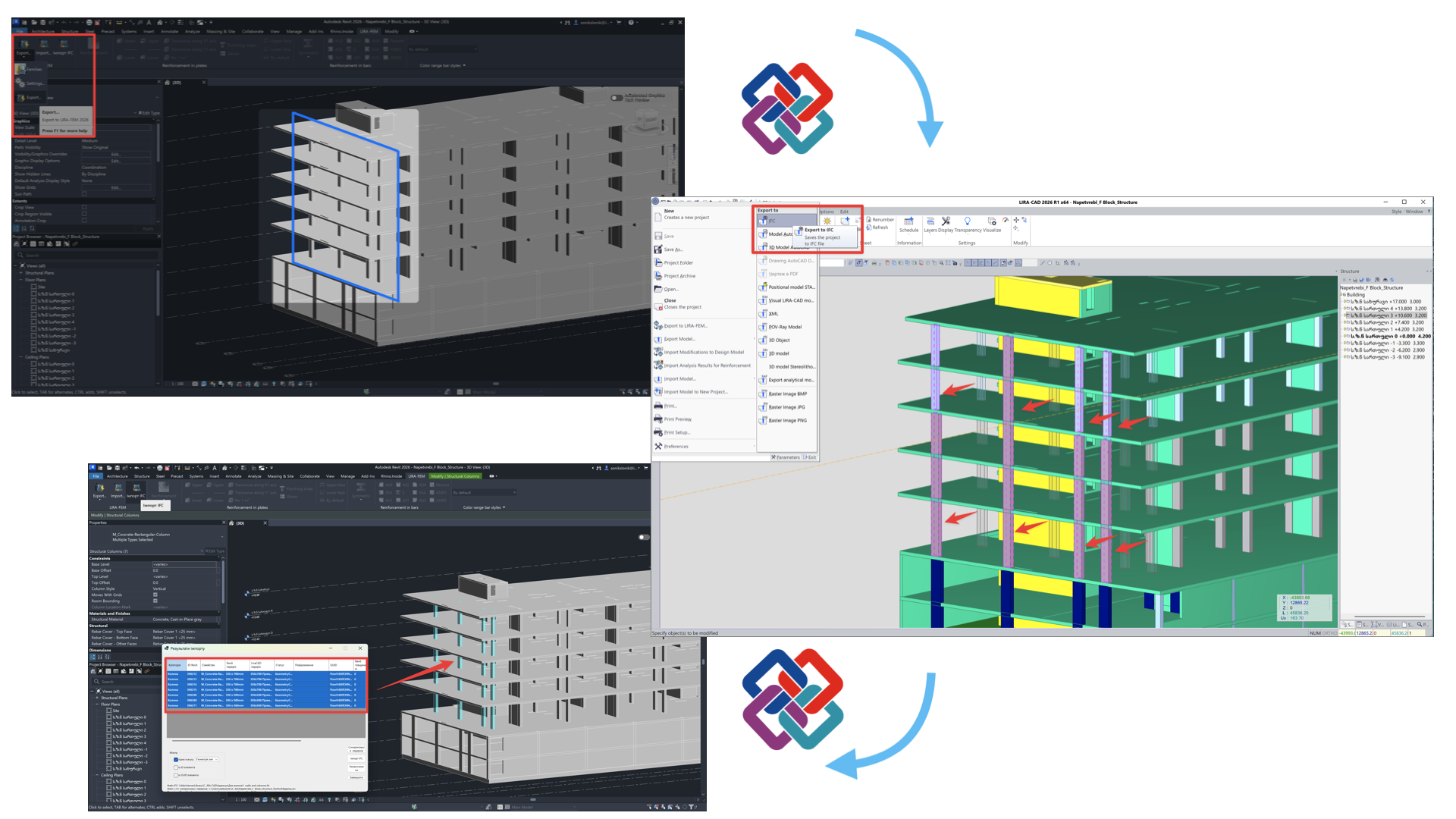
- The plugin for Revit 2026 has been updated for collaboration with LIRA-CAD and LIRA-FEM 2026. Correct two-way exchange of analytical models, calculation characteristics, and the physical model via IFC has been implemented.
- Settings are now remembered in the Export to LIRA-FEM 2026 dialog. When importing an analytical model from Revit, correct formation of radial walls in LIRA-CAD is ensured according to the original Revit geometry.
- An automatic comparison tool has been implemented for Revit structural elements with the LIRA-CAD model via IFC format. This solution significantly reduces the amount of manual matching of sections, thicknesses, and geometry changes of structural objects, and ensures correct display of this data in Revit.
Tekla Structures Plug-in improvements
- Adapted integration plugin for Tekla Structures 2025 and LIRA-FEM 2026. Updated mechanisms for transferring analytical models and additional data for further modeling in LIRA-CAD, as well as for updating BIM objects.
- Enhanced data exchange ensures more accurate model transfer and increases collaboration efficiency.
Rhino (Grasshopper) Plug-in improvements
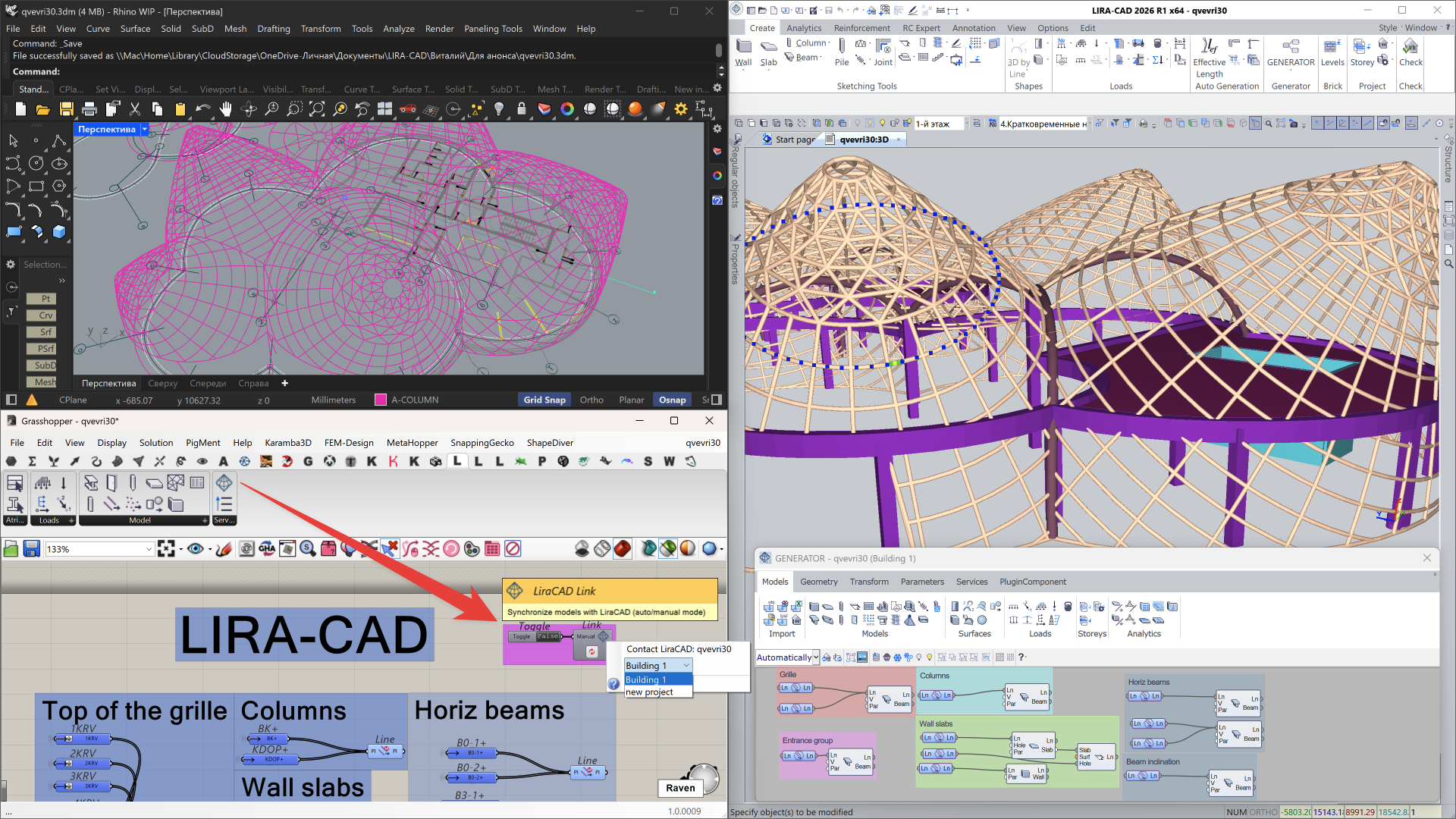
- Updated integration with Rhino 8 (Grasshopper). Implemented project-specific binding, automatic updating of the information model, data synchronization on request, as well as the ability to temporarily disable synchronization during long operations with the model on the Grasshopper side.
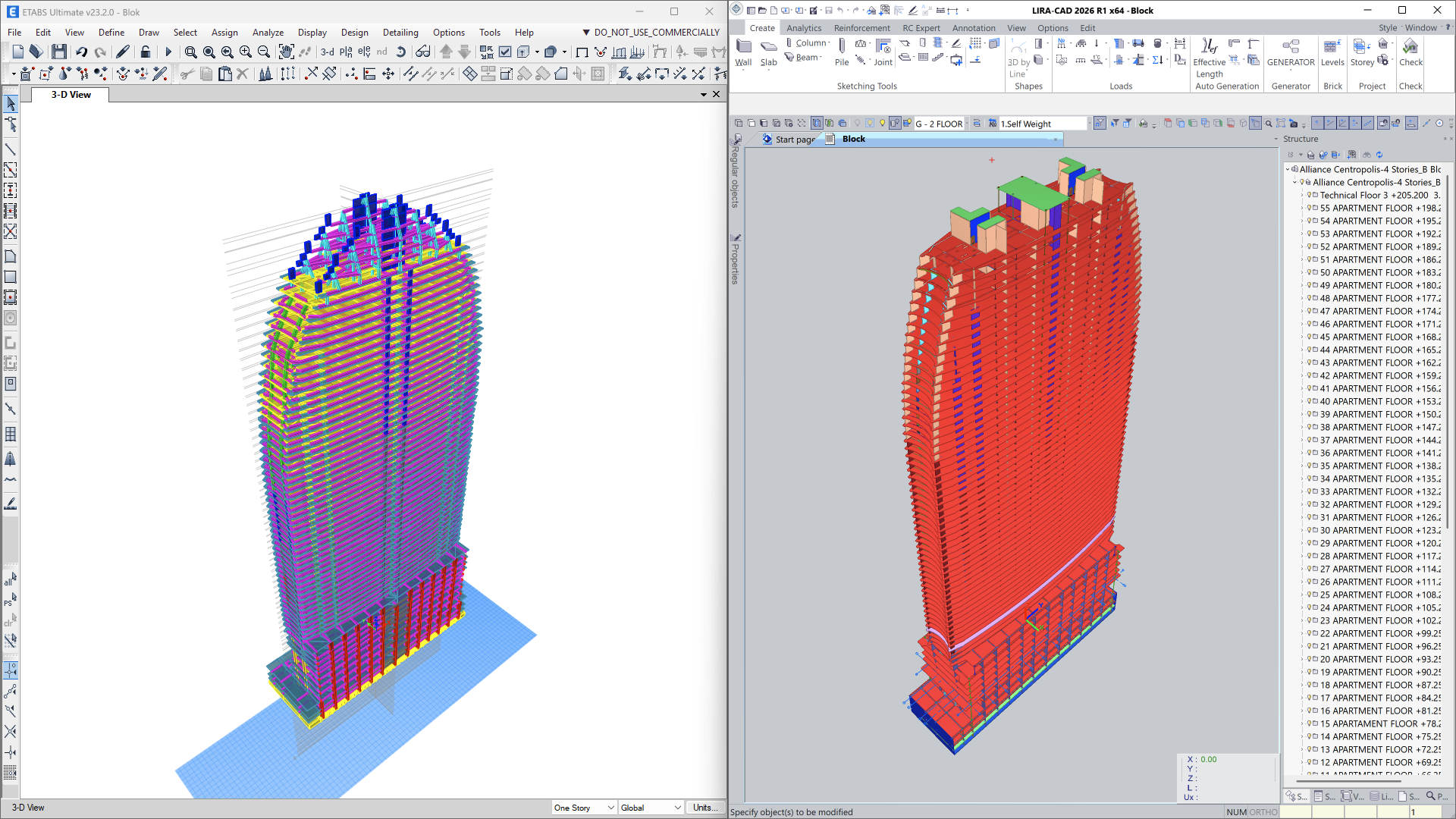
Importing a model from ETABS
-
Import of ETABS models in
*.e2kformat has been implemented with support for two workflows:- import into the analytical model for already triangulated schemes;
- import into the physical model for transferring structural objects without finite element meshing.
- Geometry, analysis parameters, and main model properties are transferred, reducing the effort required for model preparation and simplifying comparative and verification analysis.
API improvements
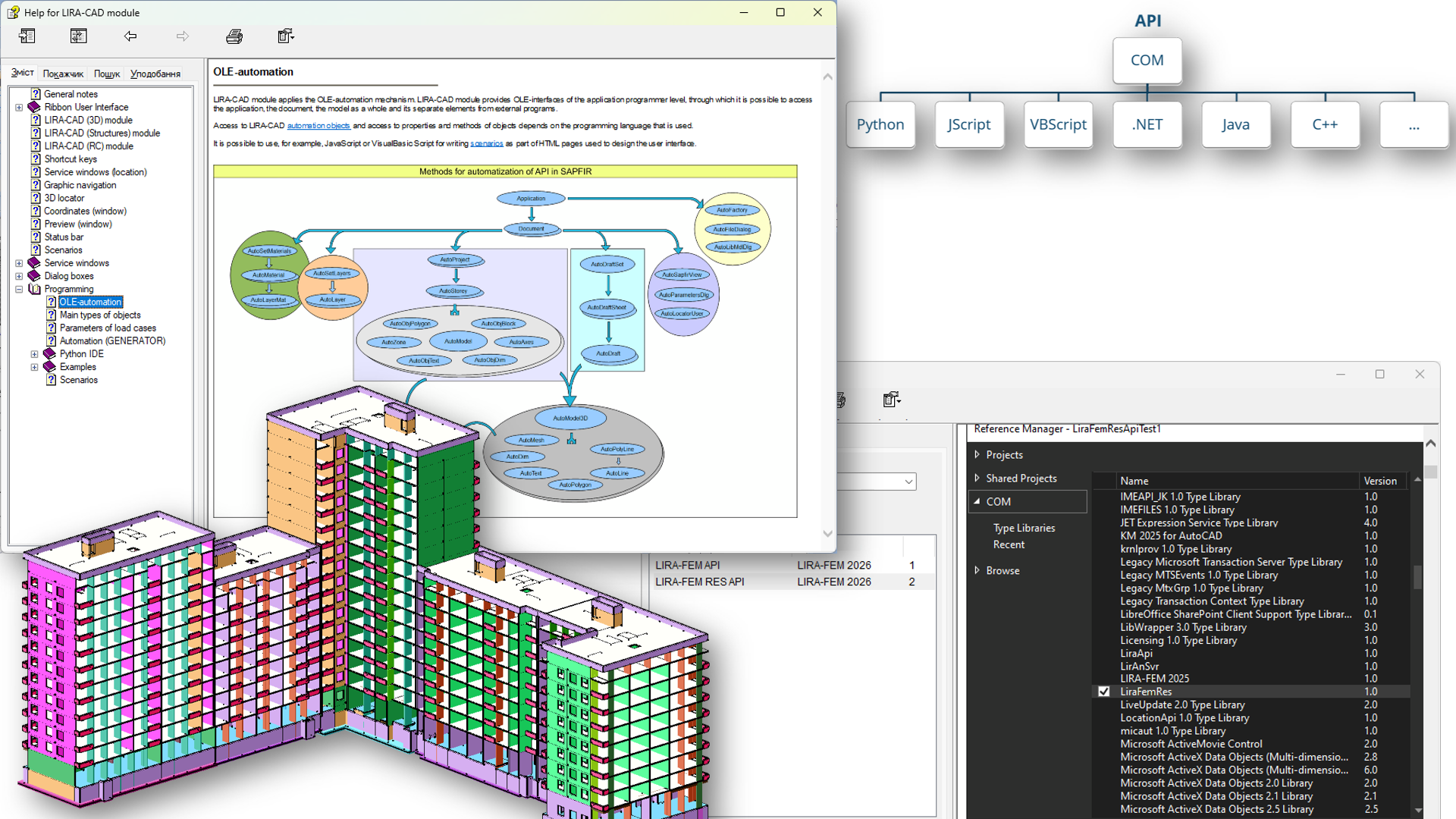
In LIRA-FEM 2026, the capabilities of interaction with the system via API have been significantly expanded. To automate routine tasks, generate complex objects, and integrate with external software, LIRA-FEM uses an API based on COM technology.
Key API Features
- Automation of LIRA-CAD: creation of custom nodes for the Generator and development of plugins.
- Input tables: programmatic control of design model data — import, adjustment, and updating via user interface or programmatically using COM technology.
- Reading and visualization: functions for obtaining analysis results and displaying them as mosaic plots, contour plots, and diagrams directly in the model window.
- Versatility: support for any programming languages that work with COM objects: C#, C++, Python, JavaScript (including V8), VBScript, and others.
User Extensions
-
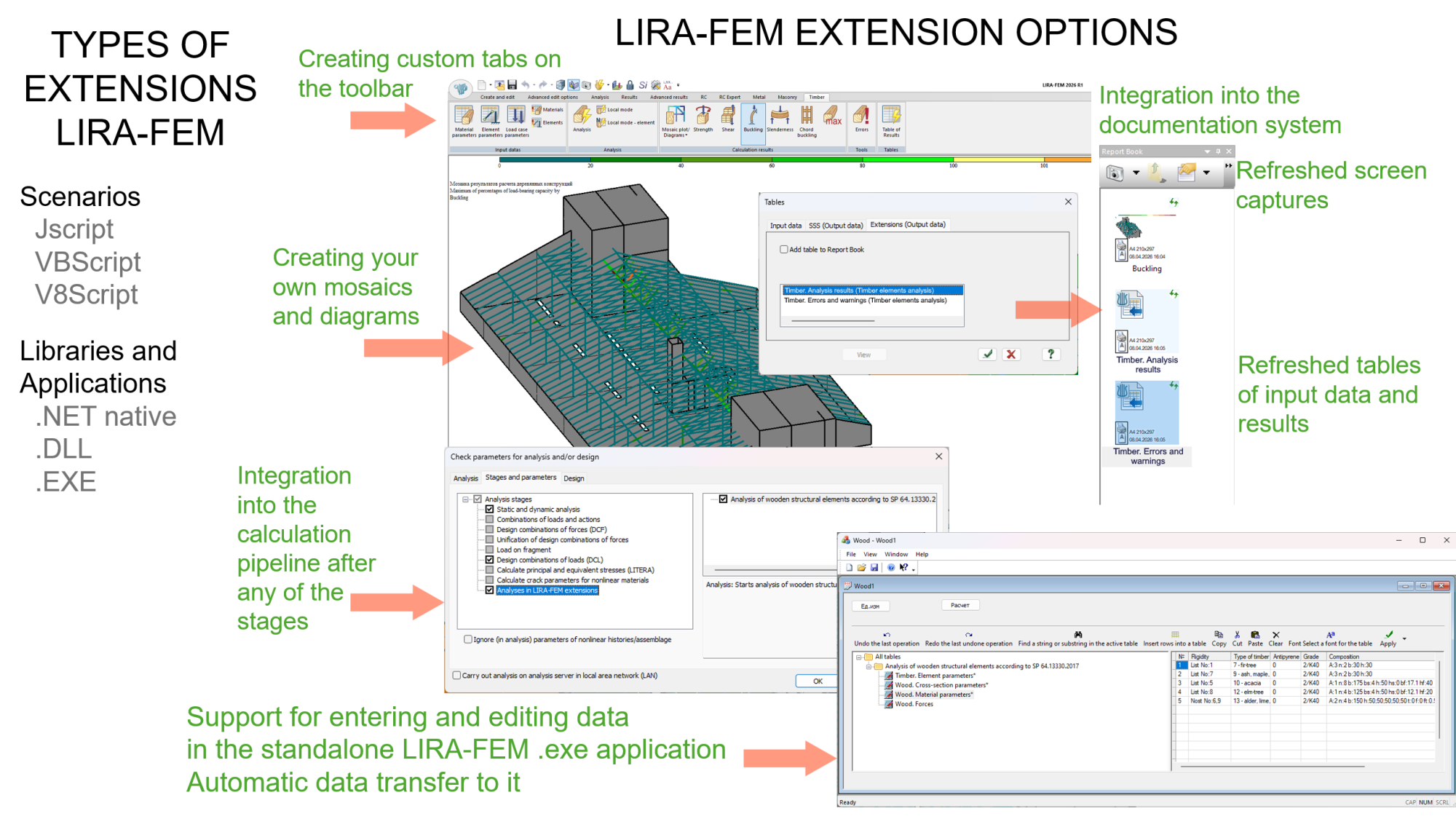
The main innovation is loading modules into the address space of the LIRA-FEM process. This gives external developers access to previously closed API functions and allows them to extend the capabilities of the software.
- Interface customization: embedding custom commands and buttons into the LIRA-FEM ribbon.
- Calculation cycle management: introducing custom data into the overall task structure and integrating specific algorithms into the calculation “pipeline.”
- Automated reporting: adding custom sections to the Report Book, including updatable CSV tables and screenshots.
- Development of new modules: a framework has been created for porting applications as LIRA-FEM extensions.
API LIRA-CAD and LIRA-FEM
-
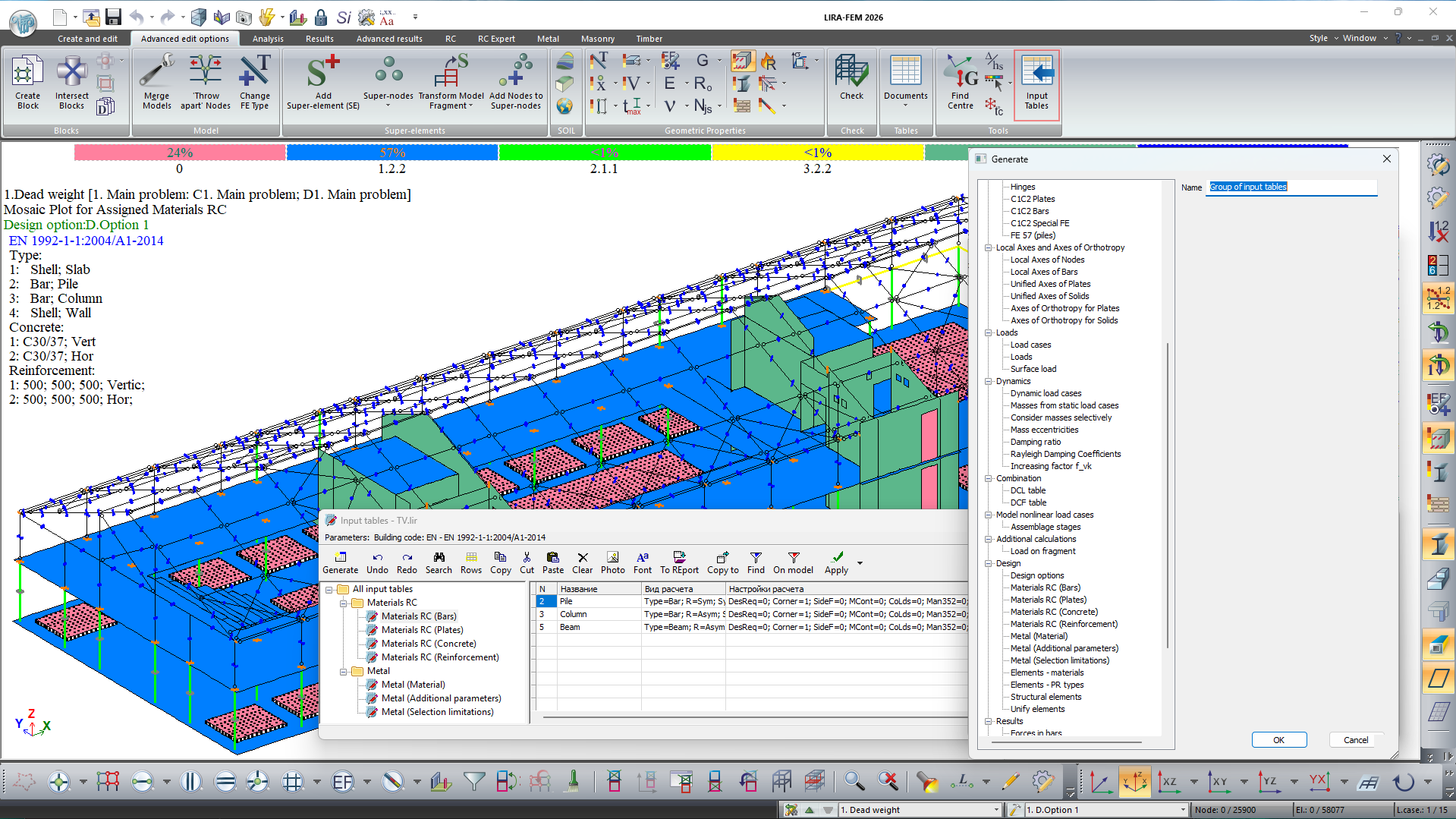
New input tables have been added for setting and adjusting design model data:
- pile stiffness — FE 57;
- materials for reinforced concrete structures: bars, plates, concrete, reinforcement;
- materials for steel sections: material, additional characteristics, selection restrictions;
- design options;
- DCF table;
- structural elements;
- element unification;
- soil model: basic, collapsible, swelling, saline, permafrost characteristics, consolidation, creep, boreholes.
- For convenience, a tree-like structure of sections has been added, as well as the ability to simultaneously delete, copy, cut, and paste multiple input tables.
Components of BIM technology
- New input tables have been added for setting/correcting data: dissipation coefficients, Rayleigh coefficients, an enhancing coefficient Fvk, and custom mosaic data.
- The creation of a single block of axes at the project level—with alignment to selected building floors—has been added, replacing the axes block on every floor as in previous program versions.
- Import of the IFC model into the configured project template has been implemented.
- When importing multiple buildings from IFC, the option to import them into separate buildings in LIRA-CAD has been added.
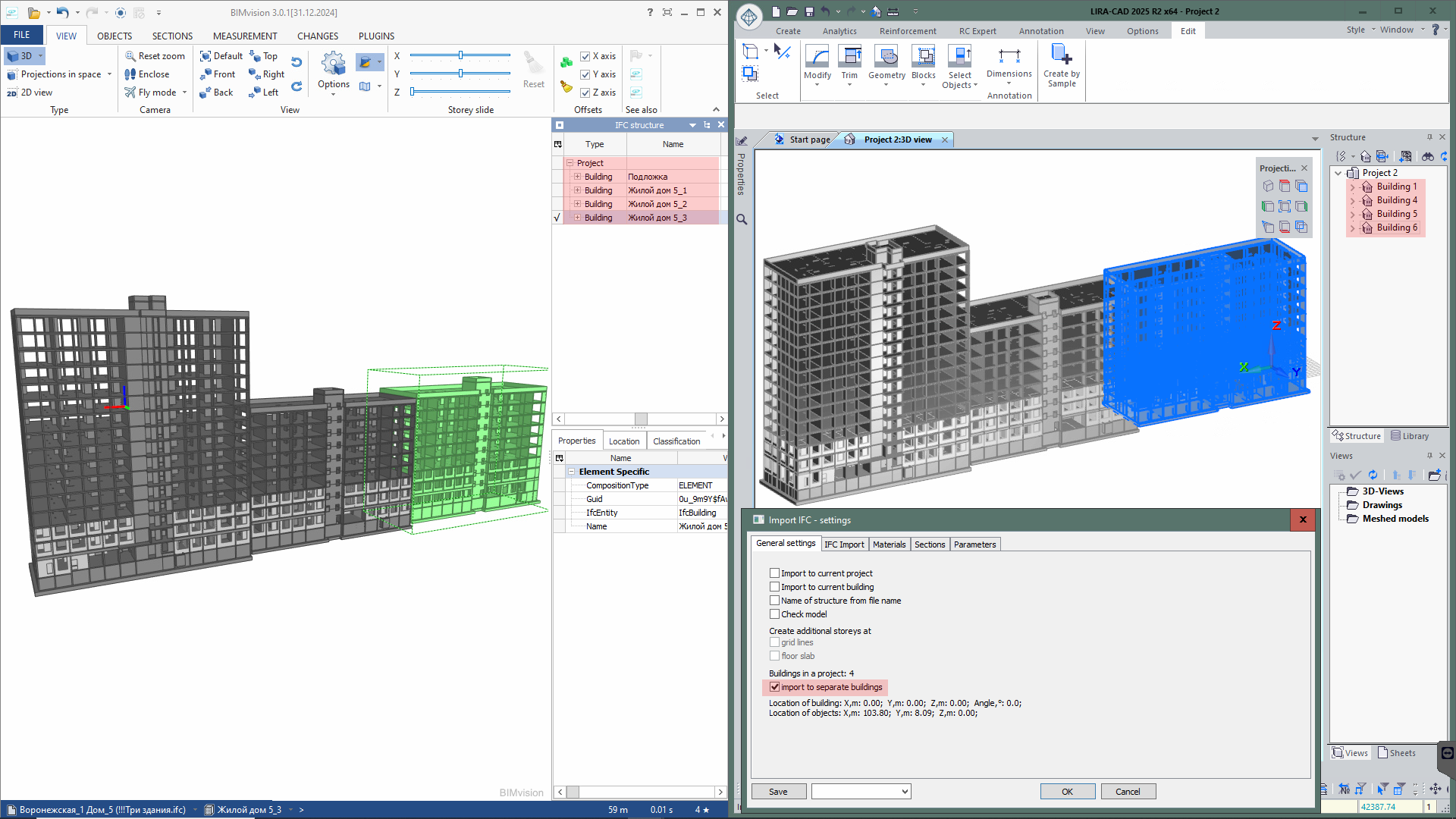
- The ability to import DWG floor plans into the current or a new project has been added.
- Automatic creation of openings along curved walls based on the DXF/DWG base for floor plans has been added.
- Display of the selected layer (instead of the List input name) in the “Layer Filter” node has been added.
- Improved recognition of the thickness of curved walls when constructing walls along the contour from the DXF/DWG base.
- Creation of openings along curved walls using the “Create windows at the intersection of walls and lines” node with the DXF/DWG base has been added.
- For the node “Advanced floor creation based on specified levels,” an option has been added to enable floor creation as in previous program versions (option “Upper floor levels – Yes”).
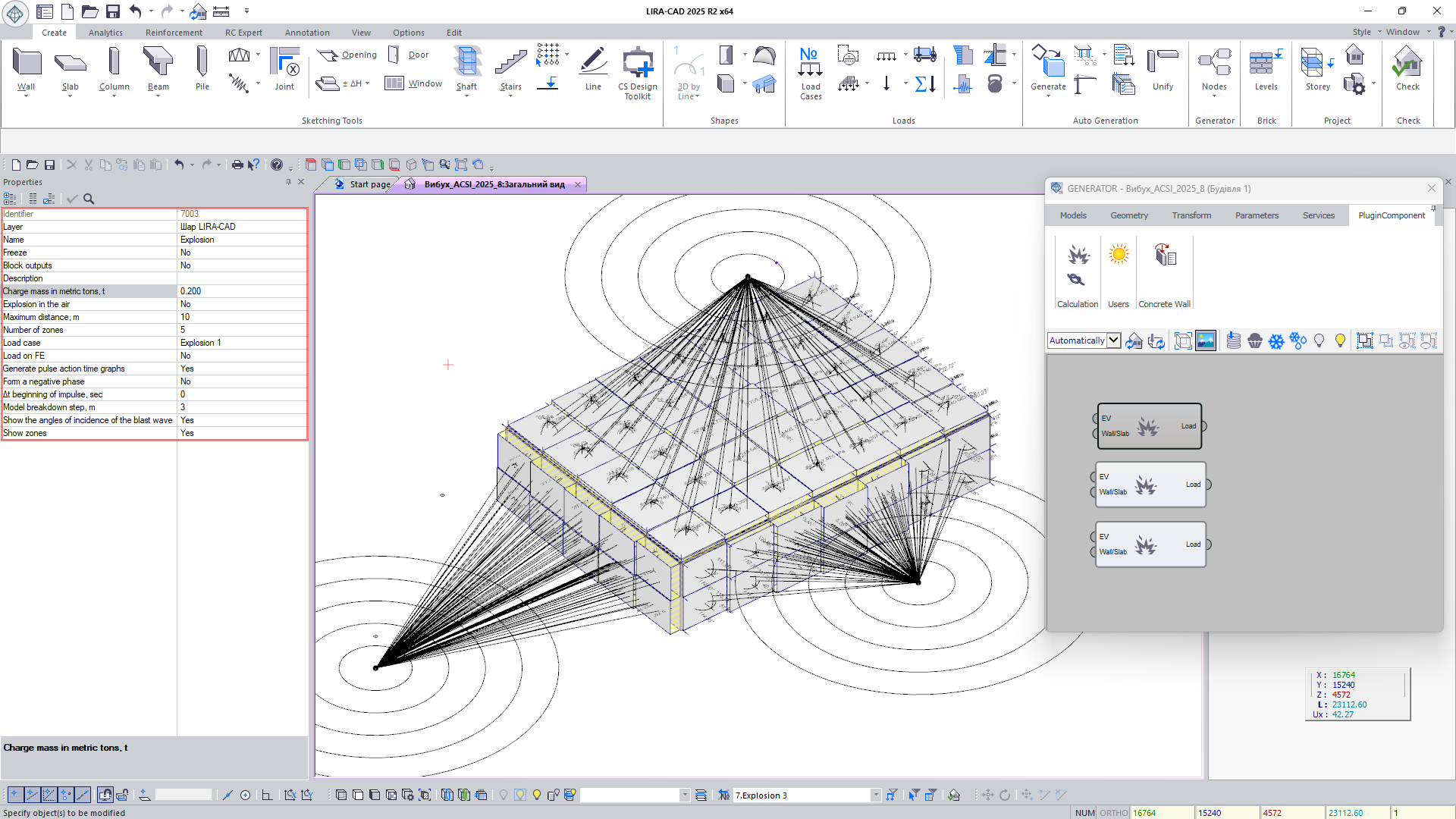
- Expanded functionality of the Blast node: an option has been added to account for or exclude the formation of a negative blast phase when constructing the graph of the explosive wave impulse’s effect (see blast analysis); for rear walls (those positioned at angles greater than 160° relative to the explosion epicenter), the gradual pressure increase caused by the shock wave’s flow along their back surface is taken into account.
Rhino (Grasshopper) Plug-in improvements
Adaptation of plug-in for integration of LIRA-CAD 2025 and Rhino 8 (Grasshopper)
Adapted plug-in for two-way integration between LIRA-CAD 2025 and Rhino 8 (Grasshopper). This technology allows not only importing complex geometrical shapes from Grasshopper and converting them into LIRA-CAD structural objects, but also performing reverse data transfer. LIRA-CAD structural objects can serve as a basis for creating geometry in Grasshopper; it allows the user to take into account the real location of structural elements and use their geometry for accurate modelling of additional parts of the building in Grasshopper.

Interaction between LIRA-CAD module, Rhino, Revit and Archicad
Interaction between Rhino 8 (Grasshopper), Revit (Rhino.Inside.Revit), Archicad (Archicad Live Connection) and LIRA-CAD (Generator) is supported. It allows you to work with a single model and ensure data consistency at all stages of design.
New plugin features:
-
SapfirUpdate
With this node, you can only update the model in LIRA-CAD when requested, which is useful for large projects where frequent updates can hinder efficiency.
-
LoadPnt2
This node generates concentrated loads with a specified direction and intensity determined by the mutual location of two points. The load is generated between the appropriate input points, and the load value and direction depend on the distance between them.
-
LoadArea
Node for creating a non-uniformly distributed load with the option to define an arbitrary contour and taking into account the openings in the load zone.
-
LoadLine
The load allows you to define linear loads with controlled vector direction. The load can be non-uniform and the angle of application is controlled by the direction vector. You could define the objects that the load will be applied to.
-
LoadPnt
Node for specifying point loads, where the user defines the coordinates of the point at which the load is applied to, the direction of the load vector and the load value.
Generator improvements
New nodes are added to the Generator system to extend its functionality:
-
New node Objects in project: stores complete information about all objects in a project, facilitating data management at all stages of design. It allows you to quickly find and select elements by specified criteria such as type, properties or location.
 Node 'Objects in Project'
 - Concentrated load at point: node allows you to specify point loads at specific locations in the structure. The user can define not only the coordinates where the load is applied to, but also define the direction of the load using a vector and define the load value.
-
Generate linear loads by the specified load: this node implements the process of determining the required load intensity and application of loads to objects. The user can specify the line along which the load will be distributed and select the elements, such as bars, that the load will be directed to. For accurate modelling, the direction of load propagation can be adjusted by specifying the appropriate vector.
Once all parameters are defined, the load is visually displayed on the model. So, the user could verify that the load is applied correctly and make any required modifications. - Contour fragmentation: node splits (cuts) a complex closed contour into square contours in which the side is equal to the specified fragmentation step. This tool is especially useful when you need to approximate curved contours for further evaluation or processing.
-
Advanced generation of storeys by height and number: this node provides flexible tools for modelling the storey of a building with account of the height and number of storeys. This feature is very popular with users who have called for its further development. All of this information is now simply contained in a single node, eliminating the need to enter other nodes that were previously used to indicate the number of storeys and their heights.
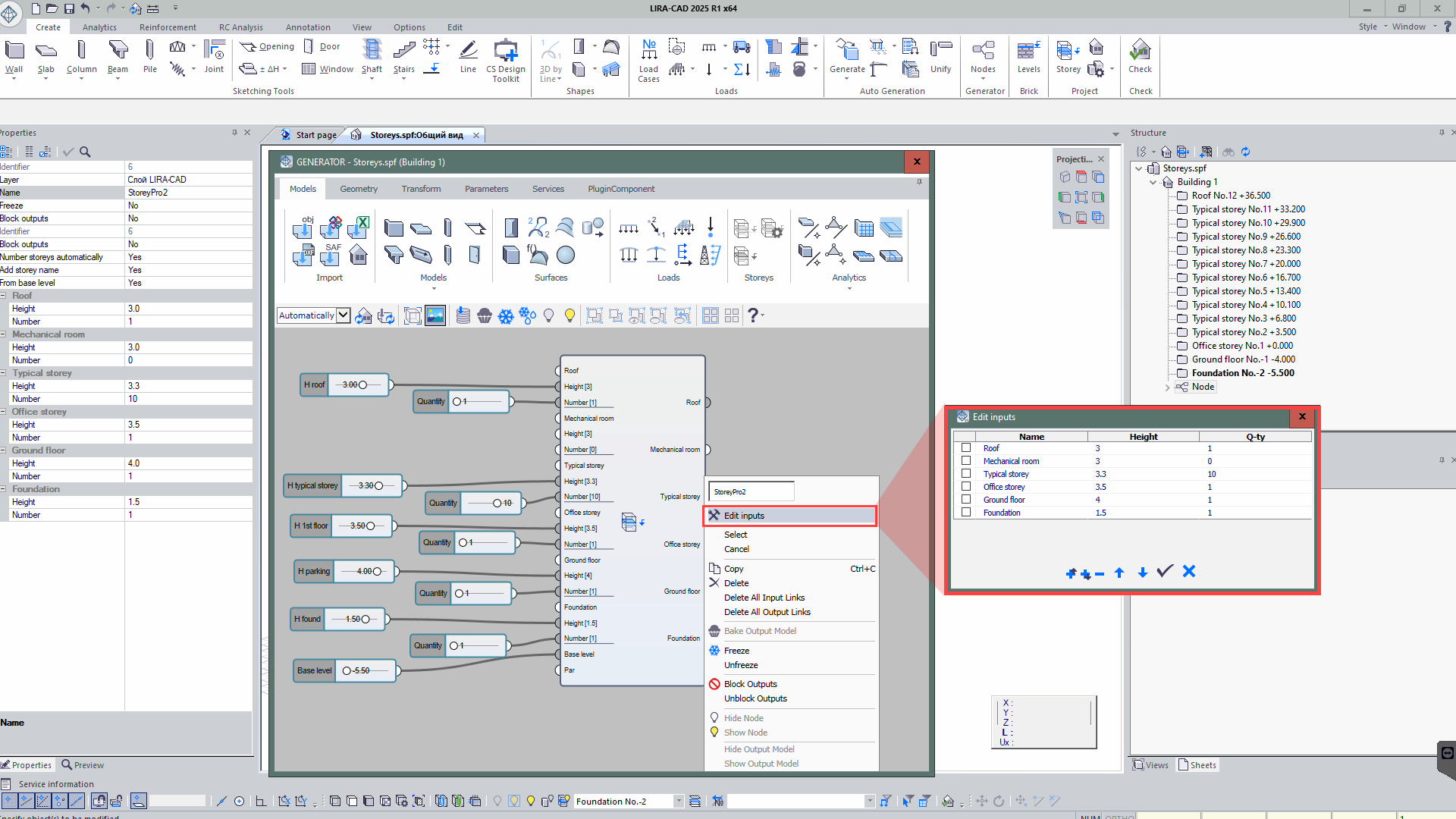 Node 'Generation of storeys'
 -
Compute the centre of mass and normal vector of a contour: this node provides the option to compute the centre of mass and normal vector for contours.
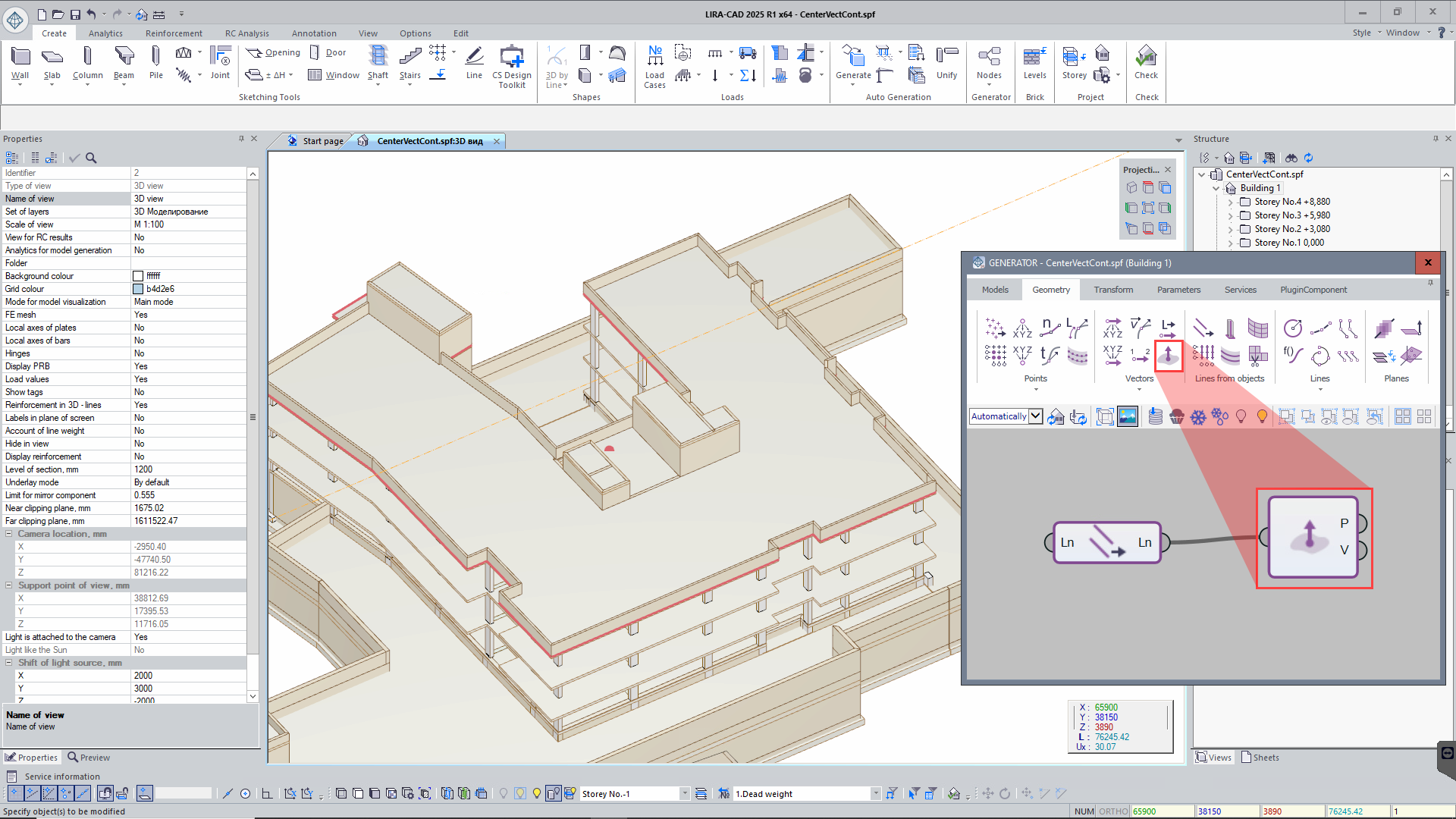 Node 'Compute the centre of mass and normal vector of a contour'
 - Extended functionality of the Block of nodes: now it supports nested blocks, allowing you to place one block inside another.
- Vector product, angle between vectors: this node extends the options in working with vectors, allowing to perform additional mathematical operations. In addition, the option to calculate the angle between vectors allows you to evaluate the relative orientation of elements in space.
- Function graph value: this node is mentioned to calculate function values at specified points based on the provided graph. It allows you to obtain Y values for certain X values based on the specified data. When this node is applied, the user could efficiently obtain function values at arbitrary points; it is especially useful when you need to interpolate or extrapolate between known points.
- Generate segments between all points of array P0 and array P1: this node automates the process of creating segments between sets of points; it allows you to connect each point in array P0 to each point in array P1. This greatly simplifies the generation of complex geometric structures where many points should be connected to each other.
-
New node Tunnel: solves the problem of confusing links in complex models by providing a 'wireless' way to transfer data between elements. Links are created automatically based on matches in key names, simplifying the model structure and making it easier to work with elements that are far apart on the canvas.
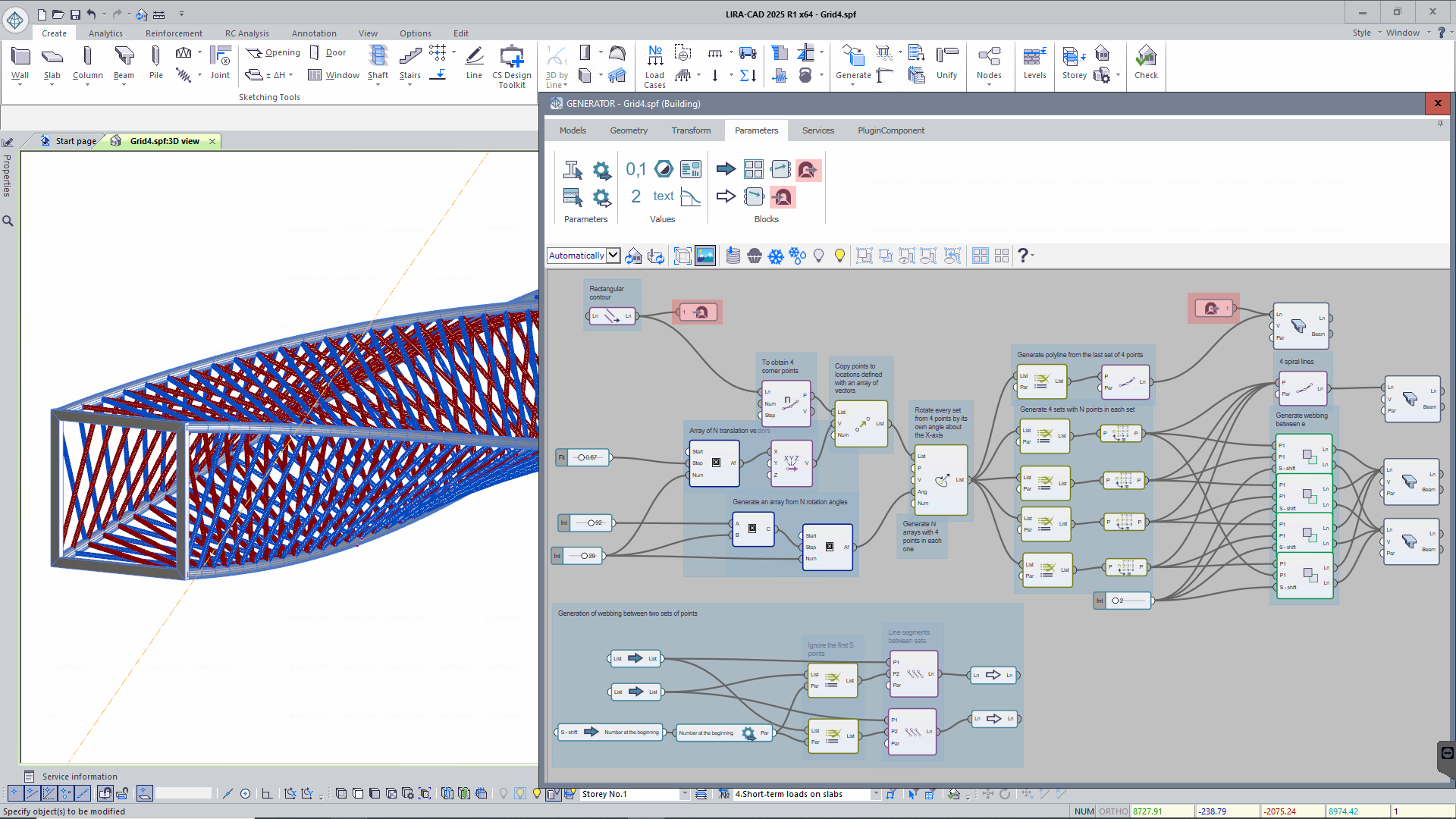 Node 'Tunnel'
 -
New node Multiplexer: optimizes the work with variant models, allowing you to create and manage multiple design options in a single project without duplicating files.
- Fast replacement of design elements: it is easy to replace elements based on the line and the original object.
- Option to modify properties for elements that are of the same type: to work with one type of element, modify its properties in different ways.
- Easy variant management is possible because to the multi-layer technique, which eliminates the need to navigate between files to control and adjust parameters.
-
New nodes Crack in the slab and Crack in the wall: these nodes allow modelling damage/defects in building structures with special FEs. The user can define a line that follows the trajectory of crack propagation. Then adjust the step, stiffnesses, and UCS position for the special FEs to simulate the damage.
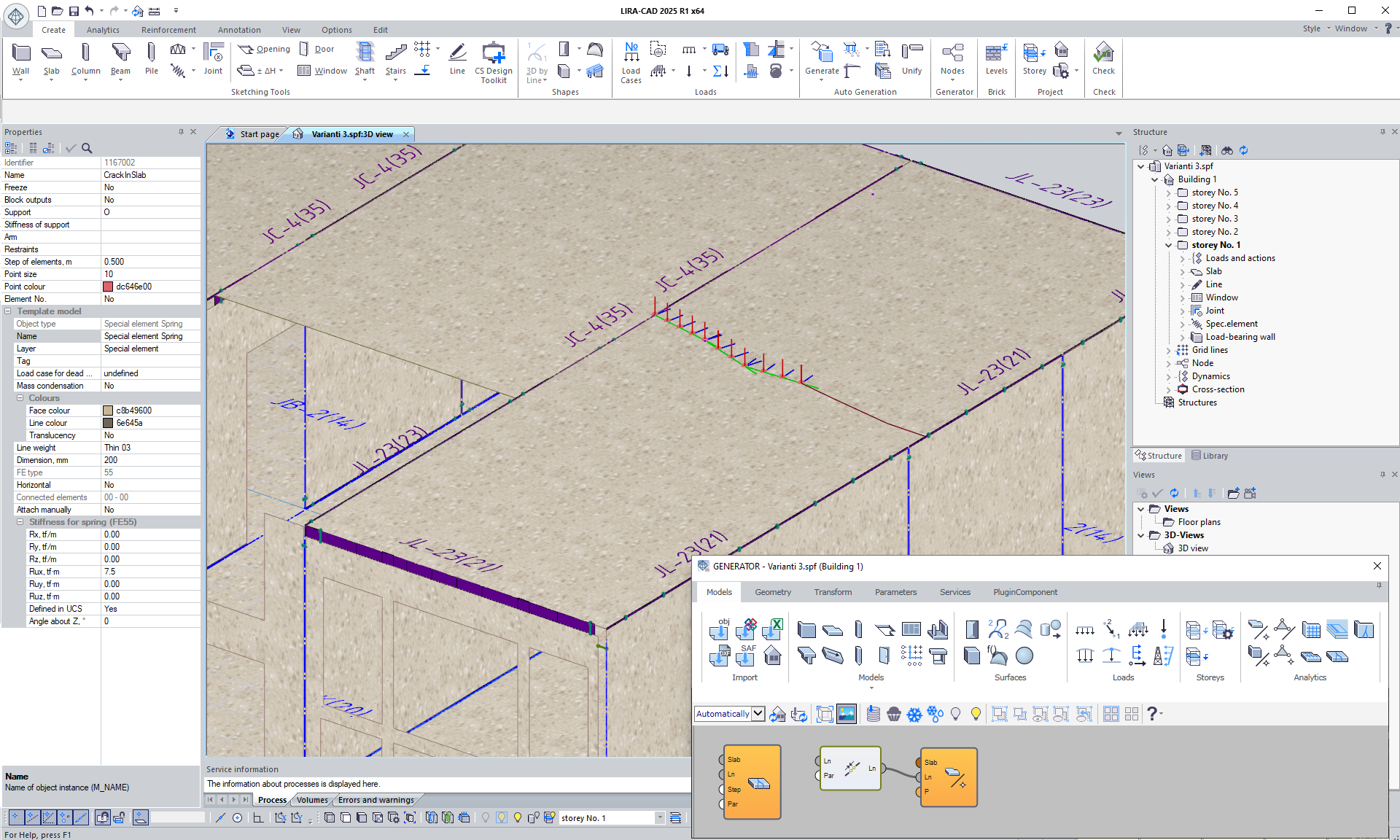 Node 'Crack in the slab'
 - The properties of the node Filter elements of specified layer: a convenient drop-down list with all model layers is now displayed instead of a dialog box. It allows you to select the required layer faster and significantly speeds up the work process.
- In the node of creating piles by points, it is now possible to select any cross-section from the LIRA-CAD library. This improvement allows more accurate modelling of the meshed model and reduces the need for manual editing when some parameters are missing in the nodes.
- In the node DXF/DWG Import files, there is now an option to group and split standard storeys. It allows simplifying and speeding up the input of structural objects if they are the same on standard storeys. When splitting, the flexibility to add structural elements with unique features to the storeys of the same type is preserved while ensuring the convenience and efficiency of working with this node. The underlay by storey mode will also automatically generate storeys based on the number of standard underlays in the file, as well as locate underlays on storeys and align storeys in the plan according to the specified base points.
- In the node Symmetry of objects relative to plane/line, the work algorithms are updated, and the model generation procedures employing its functions are optimized.
DWG export/import improvements
In the LIRA-CAD module, the DWG file import tool is greatly improved. The tool now enables you to generate new objects tailored for the LIRA-CAD module and more precisely modify parameters throughout the import process.
Users praised the previously created technology for importing DWG from a single file. To boost efficiency and convenience, this capability has been substantially enhanced in the latest release.

- Multi-layered drawings for a single storey:
In previous versions, all structural elements were located on one drawing, which occasionally led to crowded data. With the updated version, users can organize the structural components by category and produce many drawings for a single storey. For example:
- Separate drawing for the pile groups and foundation slab.
- Separate drawing for columns and walls.
- Separate drawing for beams and slabs.
- Advantages of the new approach:
This way of entering data makes the process more convenient and reduces the chance of errors. It is simpler to locate and modify the elements you require when they are divided by categories.
- Consistency with familiar design practices:
The new approach is closer to the standard technology of working drawings, where similar elements are displayed on separate sheets. This shortens working time, reduces the risk of errors, and makes the data entry process more intuitive without the need for retraining.
IFC improvements
Importing model to IFC format
The new LIRA-CAD module offers a more flexible and accurate way to define parameters for the work with IFC files. This greatly enhances the import process and data adaptability to project requirements. Users may now configure the correspondence between object parameters in IFC and parameters in the LIRA-CAD module. The settings can be applied individually for each type of objects, ensuring high accuracy of data transfer and correspondence.

Key features and improvements:
-
Import of the model with updating of all structures in the model:
Users can import the model to an existing building and replace the previous structures with the current version; it helps to synchronise the data at different stages of the design.
-
Import of several structures within the one project:
Import of multiple structures within a single project is supported; it simplifies the work with complex models and improves coordination between different design chapters.
-
Improved mechanism for conversion of objects:
An improved algorithm is implemented; it converts general-purpose objects into LIRA-CAD compliant structural elements, speeding up the data integration process.
-
Setting the parameters of materials and sections:
It is possible to specify material and cross-sectional parameters for each group of elements on an element-by-element basis. This provides greater flexibility in modelling and analyses, allowing the design to be adapted to specific requirements.
-
A mechanism to sort and evaluate data in the dialog box:
In the import dialog box now it is possible to sort columns; it makes working with huge amounts of data more convenient and makes data evaluation and correction easier.
-
Option to display the number of elements by groups:
There is a column with the number of elements that belong to certain groups based on materials or sections; it enables the user to quickly assess the scope of the project.
-
Flexible modification of additional parameters:
The import tool increases data transfer accuracy and facilitates collaboration with other project participants by enabling the user to set attributes such as IFC identifier, interpretation, tags, and names.
-
Improved mechanism for generation of storeys:
Updated algorithm for generation of storeys for imported buildings in case there is no information about storeys or slabs located at intermediate elevations between levels. This ensures correct generation of storeys and facilitates further work with the model.
Exporting the model to IFC format
The program exports the model to the IFC format that supports flexible configuration and permits the exported data to be modified in accordance with project specifications.
This tool provides the following options:
- To select the objects to be exported:
- all objects of the model.
- selected objects; it is convenient for transferring only individual parts of the project.
- selected and visible objects with account of the current view of the model on the screen.
-
Checkpoint snap of the building:
When exporting, you can set the exact coordinates of the checkpoint snaps for the building; it ensures correct positioning of the models in the general project and makes integrating with other applications and participants easier.
-
To customize the settings for the export:
The tool enables the user to flexibly select the parameters to be exported for each element. This includes geometric properties, physical properties, materials and other data important for an accurate description of the model.
-
To save the presets of the settings:
The presets for the export settings can be saved for easy reference. So, you could use the preset settings in the subsequent export operation, saving the time and reducing the possibility of configuration errors.
-
User-defined parameters:
The User-defined parameters tool allows the user to create a set of additional parameters that you can control during the process.
These parameters are also transferred to IFC format and can be integrated with other programs, ensuring full data consistency throughout all stages of the design process.
Tekla Structures Plug-in improvements
LIRA-FEM 2025 provides two-way integration with Tekla Structures 2024. The analytical model is exported from Tekla Structures 2024 to LIRA-FEM, while the selected reinforcement and updated finite element cross sections are imported to Tekla Structures 2024 from LIRA-FEM.
Autodesk Revit Plug-in improvements
Autodesk Revit 2025 and LIRA-FEM are integrated via a two-way converter. Thus, there is full data exchange between the programs. As a result, engineers can rapidly transfer and synchronise models, and it is possible to carry out complex analyses and design of metal and reinforced concrete (RC) structures.

Improvements in API and input tables
Expanded options to generate the model and get access to analysis results. Thus, you might use the API to generate your own modules. For example, generate complex objects, automate routine operations, and obtain information on architectural or design models so that the models can be transferred to other software and vice versa.

New input tables are added to define/edit the following data: arc grid lines; types of pilot reinforcement (PR) and their assignment to elements of the model; input data for dynamic load cases; selective consideration of masses in elements; eccentricities of mass application; loads; surface loads; loads on fragment; bar analogues; plate analogues.
Keep in mind that Input Tables can be used as an alternative way to define and edit data about design models, import data from other programs, and partially copy or update the model - through the user interface or programmatically, via COM technology.

Tekla Structures Plug-in improvements
This made it possible for engineers to analyse and design metal and reinforced concrete structures more quickly and effectively by integrating data and models between Tekla Structures 2023 and the LIRA-FEM program.
Generator improvements
-
A new technology for dynamic link with DWG files is introduced. All of the model and storey data may be specified in a single file, which makes it more easier to coordinate the project and make modifications, and it also reduces the possibility of errors when working with several files.
-
To create both main and additional reinforcement zones in floor slabs and foundation slabs, new tools have been developed. So, it will be simpler to move a design option from a 2D drawing to a 3D model of the project.
-
Improved nodes for IFC import are a significant factor that helps make structural items specified in IFC files easier to understand, even when their geometry is distorted.
-
For the nodes, it is possible to define the linear and surface loads in the model. The intensity of these loads vary. Because of this, you can more precisely simulate design models and more accurately describe the actual behaviour of the building.
-
New parameters are introduced for the surface load; triangulation of slabs and walls depends on these parameters.
-
Using pre-defined shapes, such as polylines or underlays, is not the only way to create openings. The perimeters of the current structural elements, such as the beams, slabs, and columns, may also serve as a basis. Using the dimensions and shapes of the existing objects, this approach generates openings more quickly and accurately. This method eliminates the unnecessary step of drawing individual contours for every opening, considerably accelerates the modelling process, and improves design correctness and efficiency.
Rhino (Grasshopper) Plug-in improvements
-
To work in the Rhino 8 (Grasshopper) environment, the LIRA-CAD 2024 plug-in was modified. It allows geometry to be transferred from Grasshopper to the LIRA-CAD module natively. A two-way integration between Rhino 8 (Grasshopper) and the LIRA-CAD module is developed in this version of the program.
Model update improvements
The "feedback" options between the project's design model (VISOR) and analytical model (LIRA-CAD) have been improved. The LIRA-CAD module can now receive updates to cross-sections of elements that were modified in the VISOR module in addition to the results of strength analysis and analysis of reinforcement
If the stress-strain state of the structure is evaluated and it is necessary to relocate columns or modify the cross-sections of certain elements, then such modifications may be transferred from the VISOR module to the LIRA-CAD module with a single click. So the changes will be automatically applied to the LIRA-CAD physical model, which reduces the errors in case the model is updated manually and provides additional time for decision-making and modelling alternatives.
Новости 1 - 20 of 24
First | Prev. | 1 2 | Next | Last